June, 2026
Event
Blog
What to Send a Coffee Cart Vendor Before Your Event Guide
Before your event, send your coffee cart vendor a clear event brief. This should include your event date, venue address, guest count, service time, access details, power and water information, menu needs, dietary requests, and a day-of contact.
For Melbourne events, it also helps to send loading instructions, parking notes, lift access, floor plans, and any venue rules. These details help your coffee cart team arrive prepared, set up faster, and serve guests with fewer delays.
Why Sending the Right Details Matters
A coffee cart can bring energy, warmth, and a polished guest experience to your event. But good coffee service depends on more than the espresso machine.
Your vendor needs to understand the venue, the crowd, the timing, and the setup space before they arrive. When those details are clear, the barista team can plan stock, equipment, access, and service flow properly.
If you are still comparing suppliers, it is worth reviewing your coffee cart booking questions before confirming the booking. This helps you choose a vendor who can support your event style, guest numbers, and venue conditions.
What to Send Your Coffee Cart Vendor First
Event Date and Location
Start with the basic event details. Your vendor needs these to confirm availability, travel time, and setup planning.
Include:
Event date
Venue name
Full street address
Melbourne suburb or regional location
Indoor or outdoor setup
Start and finish time
Expected coffee service time
For events outside central Melbourne, include any travel or parking notes you already have.
This is especially useful for private venues, schools, estates, warehouses, community events, and outdoor locations.
Event Type and Guest Profile
Tell your vendor what kind of event you are hosting. A corporate breakfast, wedding, expo, sports day, and community festival all need different planning.
Useful details include:
Type of event
Guest age group
Formal or casual style
VIP guests or speakers
Staff, clients, families, or public guests
Expected pace of service
For example, a business event may need fast service during arrival and morning breaks. A wedding may need a softer setup that matches the style of the venue. A public event may need clear queue flow and strong signage.
Guest Count and Service Window
Your vendor needs to know how many people may order coffee and how long the service window will be.
Send:
Total guest count
Expected coffee drinkers
Service start time
Service finish time
Any peak coffee moments
Do not only send the total guest number. A 200-person event over four hours is different from a 200-person event with one short morning tea break.
If your event is in a busy season, plan ahead and check early booking timeframes so you have more choice with dates, times, and setup options.

Event Run Sheet and Timing Details
Why the Run Sheet Helps
A run sheet helps your coffee cart vendor understand when guests will arrive, move, break, and leave. This makes it easier to plan service flow.
Send the full run sheet if you have one. If not, send a simple timeline.
Key Moments to Highlight
Mark any periods when coffee demand may rise.
Common high-demand times include:
Guest arrival
Registration
Morning tea
Lunch break
Post-ceremony period
Conference session breaks
Networking sessions
Staff changeover
Market or festival opening time
For Melbourne businesses booking coffee for meetings, training, or client days, coffee for workplace events should be matched to staff movement and meeting times. This keeps the service smooth and avoids long queues during short breaks.
Simple Timeline Example
Time | Event moment | Coffee cart note |
7:30 am | Vendor arrival | Access to loading area required |
8:00 am | Guest arrival | Coffee service begins |
10:30 am | Morning break | Peak service period |
12:00 pm | Lunch | Lower demand expected |
2:30 pm | Afternoon break | Second peak service period |
3:30 pm | Pack-down | Venue contact to confirm exit |
Venue Access Details
Bump-In Instructions
Bump-in means the time and process for your vendor to arrive, unload, and set up.
Send clear bump-in details, including:
Earliest arrival time
Loading bay location
Parking area
Delivery entrance
Lift access
Stair access
Security sign-in process
Contact person on arrival
Melbourne venues can have tight loading zones, shared docks, paid parking, and strict access windows. A clear access plan helps avoid late starts and stress on the day.
Parking and Loading
Parking is often one of the biggest issues for mobile vendors. Do not assume your vendor can park close to the venue.
Send:
Parking instructions
Loading zone rules
Permit details
Height limits
Time limits
Paid parking notes
Distance from vehicle to setup space
If the cart must be moved through a long hallway, lift, courtyard, or public space, tell the vendor early. This may affect setup timing.
Indoor and Outdoor Access
Indoor and outdoor events have different setup needs.
For indoor events, send information about lifts, door widths, flooring, power points, and venue rules.
For outdoor events, send details about shelter, ground surface, weather plans, wind exposure, and public access.
Many planning issues come from small missed details. A quick check of common organiser planning gaps can help you prepare a stronger vendor brief.
Power and Water Information
Power Requirements
Coffee carts often need reliable power for coffee machines, grinders, fridges, lighting, or other equipment. Your vendor will tell you their exact requirements, but you should still send what the venue can provide.
Include:
Power outlet location
Distance from cart space to outlet
Indoor or outdoor power access
Whether extension leads are allowed
Generator rules
Any venue power restrictions
Do not guess if you are unsure. Tell the vendor what you know and ask the venue to confirm the rest.
Water Access
Some coffee carts bring their own water supply, while others may need access to water on site. This depends on the vendor, service time, and event size.
Send:
Nearest water access point
Distance from setup area
Whether water is potable
Any venue rules about filling tanks
Wastewater rules
Cleaning or disposal instructions
Clear coffee cart utility needs help the barista team plan safely and avoid last-minute equipment issues.
Power and Water Checklist
Detail to send | Why it helps |
Outlet location | Helps plan cart placement |
Power load limits | Prevents overloads or outages |
Extension lead rules | Avoids safety issues |
Water access point | Supports refills and setup |
Wastewater rules | Keeps venue compliant |
Generator policy | Helps with outdoor events |
Coffee Cart Placement and Guest Flow
Where the Cart Should Go
The best coffee cart position is easy to find, easy to queue for, and close enough to the main event area without blocking movement.
Good locations include:
Near registration
Near networking areas
Beside breakout spaces
Close to food stations
Near outdoor seating
At a clear entry point
Poor locations include narrow doorways, emergency exits, busy corridors, or hidden corners.
Queue Flow
Your vendor should know where guests will stand while waiting. Send a floor plan or photo if possible.
Think about:
Where the queue will form
Whether guests will block walkways
Whether signage is needed
Whether staff need a separate line
Whether the cart is near noise-sensitive areas
For high-traffic events, best coffee cart position can improve visibility, reduce crowding, and create a more engaging guest experience.
Floor Plan Notes
Even a simple phone photo can help. Mark the planned cart position, nearest power point, guest entry point, and loading path.
This gives your vendor a better view of the space before they arrive.
Menu, Dietary Needs, and Guest Preferences
Drink Menu
Send your preferred drink menu early. This helps the vendor prepare ingredients, milk options, and stock.
Common options may include:
Espresso coffee
Flat white
Latte
Cappuccino
Long black
Hot chocolate
Chai
Tea
Iced drinks
Decaf
Ask your vendor what they recommend for your guest type and service time. A shorter menu can sometimes help speed up service during short breaks.
Milk and Dietary Options
Guests often expect more than one milk choice. Send any dietary needs you already know.
Common requests include:
Full cream milk
Skinny milk
Oat milk
Almond milk
Soy milk
Lactose-free milk
Decaf coffee
Low-sugar options
For weddings, coffee for wedding guests may need to feel more personal and relaxed. You may want coffee after the ceremony, during dessert, or later in the evening.
Stock Planning
Your vendor will usually manage coffee beans, milk, cups, lids, and service supplies. Still, guest count and service length help them plan the right amount.
Send any extra details that may affect demand, such as cold weather, early starts, long sessions, or guests arriving from travel.
Branding and Presentation Details
Brand Activations and Corporate Events
If your event includes branding, send all creative details early.
This may include:
Brand colours
Logo files
Cup branding needs
Signage rules
Uniform preferences
Photography guidelines
Hashtags or campaign names
For product launches, expos, and client-facing events, the coffee cart can become part of the brand experience. It should feel polished and connected to the room.
Weddings and Private Events
For private events, send styling notes. Your vendor may be able to adjust presentation to suit the mood of the day.
Helpful details include:
Colour palette
Venue style
Formal or casual dress code
Guest arrival flow
Photoshoot timing
Special moments near service time
Community and Public Events
For public events, send information about the crowd, weather plan, nearby vendors, and expected rush periods.
Broader coffee for event guests should support the whole event experience, whether guests are arriving, browsing, relaxing, or networking.
Site Rules, Permits, and Vendor Forms
Venue Requirements
Some venues need documents before a vendor can arrive. Send these early so there is time to complete them.
Common requirements include:
Public liability certificate
Food safety details
Supplier registration
Site induction
Risk assessment
Vehicle details
Bump-in form
Electrical tagging proof
Council or Outdoor Rules
Outdoor public events may have extra requirements. These can include council approval, waste rules, power rules, or food vendor conditions.
Ask your venue or event manager what is required. Then send the forms to your coffee cart vendor as soon as possible.
Waste and Cleaning Rules
Tell your vendor how waste should be handled.
Include:
Bin locations
Recycling rules
Cup disposal plan
Wastewater instructions
Pack-down cleaning rules
This helps keep the venue tidy and avoids problems after the event.
Day-of Contact Details
Main Contact
Your vendor needs one clear person to contact on event day. This should be someone who will answer the phone and knows the site.
Send:
Name
Mobile number
Role
Arrival instructions
Backup contact
Venue Contact
Also send the venue contact if they are different from the event manager.
This is useful for loading dock access, security, power issues, and last-minute site changes.
Emergency or Backup Contact
If your event is large or has several moving parts, send a backup contact. This gives the vendor another person to call if the main contact is busy.
What Not to Leave Until the Last Minute
Details That Cause Delays
Some small missing details can create large delays on the day.
Avoid leaving these until the final hours:
Exact venue entrance
Loading instructions
Power confirmation
Water access
Parking rules
Security sign-in
Final guest count
Service start time
Wet weather plan
Many issues can be avoided when you prevent avoidable setup issues before the vendor arrives.
Details That Affect Guest Experience
Other details may not delay setup, but they can affect the guest experience.
These include:
Menu choices
Dietary options
Branding
Signage
Queue space
VIP timing
Speech or ceremony timing
Photography restrictions
Coffee service should feel smooth, welcoming, and well placed. Early planning helps the cart feel like part of the event, not a last-minute add-on.
Coffee Cart Vendor Brief Template
Use this simple template when sending details to your coffee cart vendor.
Section | What to include |
Event basics | Date, venue, suburb, event type |
Guest numbers | Total guests and expected coffee drinkers |
Service time | Start, finish, and peak demand moments |
Access | Loading, parking, lifts, stairs, security |
Setup space | Indoor/outdoor, floor plan, cart position |
Utilities | Power, water, generator rules |
Menu | Drinks, milk options, dietary needs |
Branding | Logos, signage, colours, presentation |
Documents | Insurance, permits, venue forms |
Contacts | Event manager, venue contact, backup contact |
Example Message to Send Your Coffee Cart Vendor
Hi, we are booked for a coffee cart at our event on [date] at [venue name and address].
The event runs from [start time] to [finish time], with coffee service needed from [service time]. We expect around [guest count] guests, with the busiest coffee periods likely to be [arrival / morning break / networking / dessert / other].
The cart will be set up [indoors/outdoors] at [location]. Access is via [loading dock / main entrance / lift / car park]. Parking is available at [details]. The nearest power point is [location], and water access is [details].
Our preferred menu includes [drinks and milk options]. We also need [dietary options, branding, signage, or special notes].
The day-of contact is [name and mobile number]. The venue contact is [name and mobile number].
Please let us know if you need anything else before the event.
Final Checklist Before Event Day
One Week Before
Confirm:
Guest count
Service time
Venue access
Power and water
Menu
Vendor documents
Day-of contact
Two Days Before
Send:
Final run sheet
Updated floor plan
Parking notes
Weather plan
Any changed guest numbers
On the Day
Make sure:
The contact person is available
Access is ready
Power and water are available
The setup space is clear
Venue staff know the vendor is arriving

Ready to Make Your Event Coffee Setup Effortless?
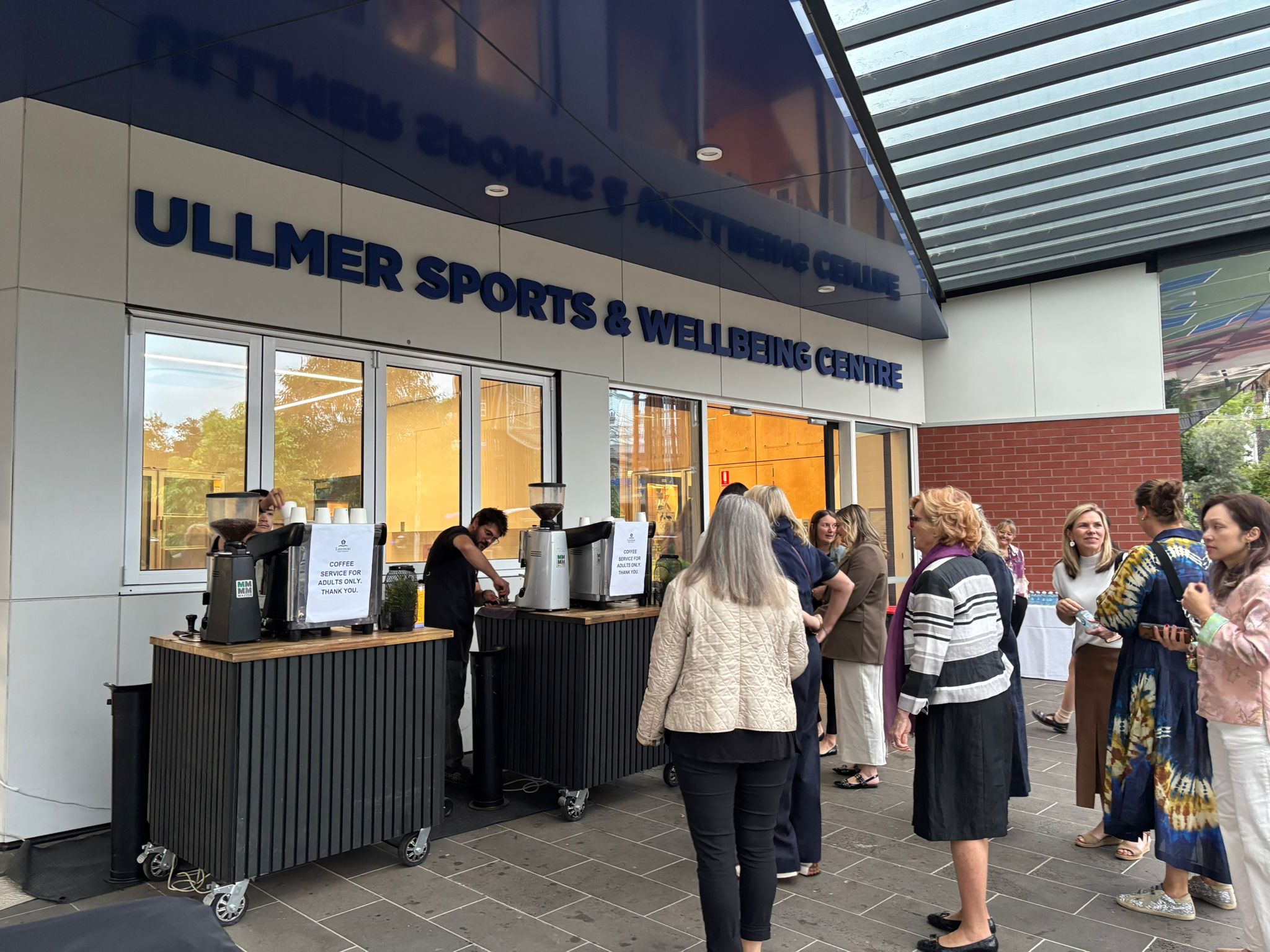
Coffee service can be one of the most memorable parts of your event when every detail is planned well. By sending the right information early, you can reduce delays, improve guest flow, and create a smoother experience from the first cup to pack-down.
It helps to think beyond the coffee machine, from power, water, and access to supplies, presentation, dietary options, and barista experience. For a polished, flexible, and fully equipped mobile coffee setup in Melbourne, you can Connect with Jeepsy Support team to plan a service that fits your venue, guest numbers, and event style.